Agent voice loop
How a local TTS API fits into agent workflows
The agent decides to speak, calls localhost, and gets private audio back.
1. Agent
Text response is ready
- Local assistant reply
- Scheduled notification
- Automation status update
Why it matters
A tool, script, or agent decides the reply should be spoken.
2. Localhost API
Call OpenVox on 127.0.0.1
- GET /models
- POST /models/{model}/load
- GET /voices + /languages
Why it matters
Pick a valid model, language, and voice before synthesis.
3. Speech request
Generate or stream audio
- POST /audio/speech
- Full file for scripts
- SSE streaming for live agents
Why it matters
If you get a 429, wait and retry.
4. Output
Private voice output
- Local chatbot voice
- Narrated automation
- Accessibility assistant
Why it matters
Keep the API on loopback unless you truly need LAN access.
A lot of local AI stacks still stop at text. The agent can think, call tools, summarize logs, write messages, and even orchestrate workflows, but the moment you want audible output, people often fall back to a remote speech service. That works, but it also reintroduces the exact dependency many local-first developers were trying to remove.
That is why interest in a local TTS API keeps growing. If you already run local LLMs, localhost-based automations, or privacy-sensitive tools, it makes sense to want the voice layer to behave the same way. Instead of shipping every spoken response through a third-party service, your app can call a localhost TTS server and keep the core speech path on the local machine.
The most useful local speech API is not just “text to audio.” It is a private runtime component that fits the same ownership model as the rest of your automation stack.
What is a local TTS API?
A local TTS API is a text-to-speech interface exposed by software running on your own machine rather than a hosted cloud provider. From the client side, it still looks like an API. Your script or app sends text to an endpoint and gets audio back. The important difference is where the service lives.
With a text to speech API local setup, the endpoint is usually something like http://127.0.0.1:8000/v1 instead of a remote vendor URL. That means the API can act like a normal local service inside a desktop app, a local agent runtime, or an internal automation pipeline.
Why AI agents need voice output
Not every agent needs to speak. Many are fine as background workers. But voice output is valuable when the system is interactive, ambient, or designed to be consumed without staring at a terminal or dashboard.
- Voice makes local assistants easier to use while multitasking.
- Spoken status updates are more natural for alerts, reminders, and monitoring tools.
- Automation pipelines can generate narrated media as a downstream step instead of a separate manual task.
- Accessibility tools become more useful when spoken output is part of the default interface.
Once an agent starts talking frequently, voice stops being a novelty. It becomes infrastructure. That is where the economics and privacy model of the speech layer start to matter.
Cloud TTS API vs local TTS API
Cloud vs local
Two different API models
Both can speak text. The difference is whether voice behaves like a hosted service or a local system component.
Cloud TTS API
Best for instant hosted access
- Fast to try from any machine.
- Easy for hosted apps and remote teams.
Tradeoffs
- Usage fees become operating cost.
- Private text leaves the local machine.
Local TTS API
Best for local agents and private tools
- No per-request cloud billing.
- Fits local LLMs and desktop automations.
Tradeoffs
- Requires local setup and supported hardware.
- Less convenient if everything is browser-first.
Cloud speech APIs are still useful. They are fast to start with, easy to wire into web products, and convenient when everything else in your stack already lives on hosted infrastructure. But they come with recurring cost, network dependency, and the default assumption that your spoken text leaves the local machine.
A local voice API shifts that balance. Setup is less instant, but the voice system becomes part of your environment rather than a metered external dependency. That is especially attractive for internal tools, local agents, and high-volume automations.
- No per-request cloud billing on the core speech path, which matters when internal tools or always-on agents talk frequently.
- More privacy for internal messages, client data, drafts, and automation output because core speech generation stays on your Mac.
- A cleaner fit for local workflows built around Ollama, LM Studio, desktop automations, or private tools.
- Useful for internal products, prototypes, developer utilities, and automation stacks that should not depend on a hosted speech vendor.
Why OpenVox is useful here
OpenVox is not only a Mac app with a UI. It can also expose a local TTS API for apps, agents, scripts, and automations. In the current site support content, the API is documented at http://127.0.0.1:8000/v1, with a recommended discovery flow for models, languages, voices, and speech generation.
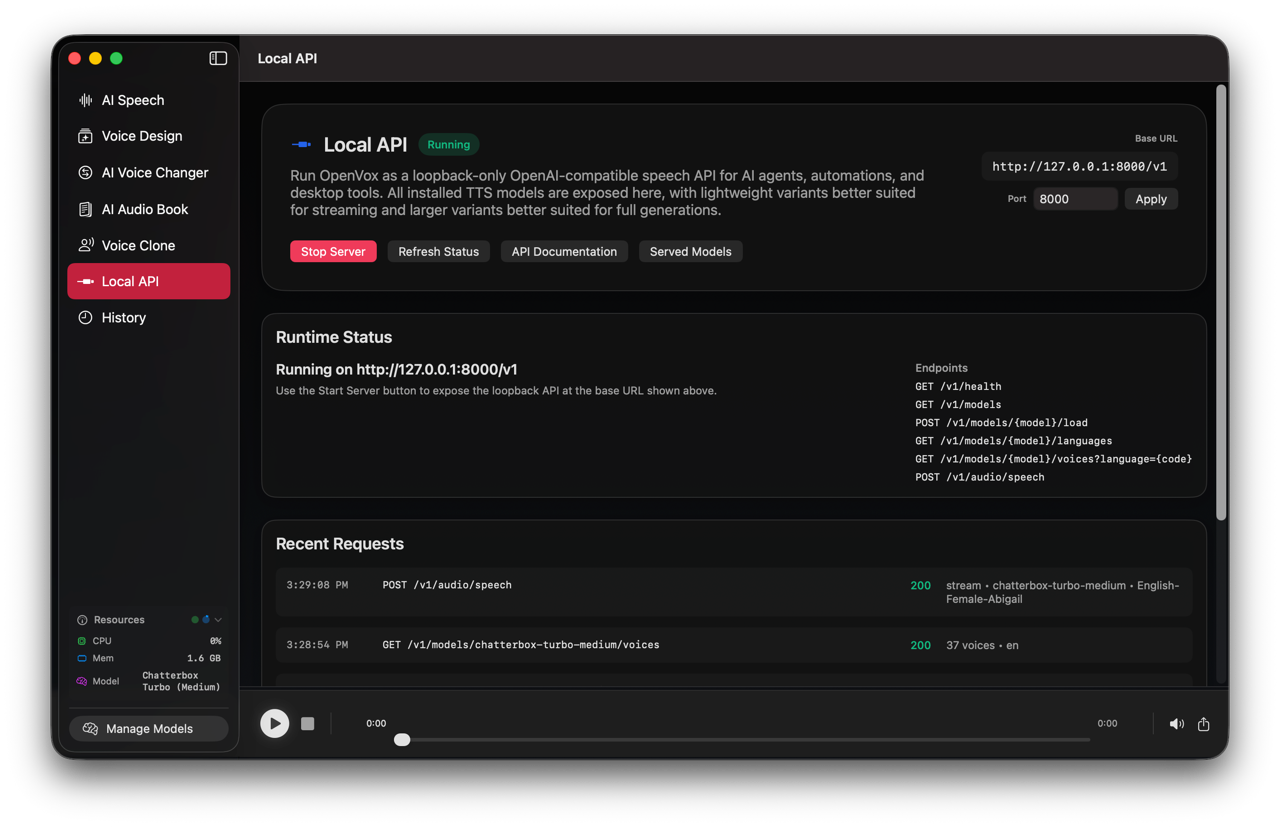
This is a strong fit for AI agent voice output because it maps cleanly to how developers already think about local services. Your agent can inspect available models, warm the one it wants, query supported languages and voices, and then synthesize audio as a normal part of the toolchain.
Example use cases for a localhost TTS server
Local chatbot voice
Turn a text-only assistant into a spoken desktop companion that reads status, answers, and summaries aloud without routing speech through a remote API.
Scripted video automation
Feed generated scripts or update summaries into a local voice layer as part of a render pipeline without paying cloud TTS fees for every run.
Notification narrator
Let a local daemon announce build failures, monitoring alerts, task completions, or calendar events in a consistent voice.
Podcast generation pipeline
Use local speech as one step inside a larger content pipeline that assembles scripts, intros, chapters, and narrated segments on your own hardware.
Accessibility assistant
Add spoken output to internal tools, reading aids, or productivity helpers where sending sensitive text outward is a bad default.
Simple API workflow explanation
OpenVox's support documentation suggests a predictable request flow rather than throwing raw speech requests at the server and hoping your model, language, and voice match. That guidance is worth following because it makes integrations more reliable.
- Call
GET /modelsto discover which model IDs are available. - Warm the model you want with
POST /models/{model}/loadbefore the first speech request. - Check valid language codes with
GET /models/{model}/languages. - Pick a compatible voice using
GET /models/{model}/voices?language={code}. - Send the real speech request to
POST /audio/speech, either as a full file or as a stream.
OPENVOX_API="http://127.0.0.1:8000/v1"

curl "$OPENVOX_API/models"
curl -X POST "$OPENVOX_API/models/kokoro/load"
curl "$OPENVOX_API/models/kokoro/languages"
curl "$OPENVOX_API/models/kokoro/voices?language=en"

curl -X POST "$OPENVOX_API/audio/speech" \
  -H "Content-Type: application/json" \
  -d '{
    "model": "kokoro",
    "input": "Your local agent can speak this response.",
    "language": "en",
    "voice": "af_bella",
    "response_format": "wav"
  }' \
  --output openvox-reply.wav
The same docs also describe a streaming mode for incremental playback, using server-sent events such asresponse.created, audio.chunk, and response.completed. That is especially useful when you want a more conversational feel instead of waiting for the full file to land before playback.
One important operational detail: the support page notes that only one generation or preload job can run at a time, so if your offline TTS API call returns 429, your integration should wait and retry rather than assume the server is broken.
Security note: keep it localhost-first
The safest design is loopback-only by default. OpenVox's own support guidance explicitly says to keep the API on loopback unless you intentionally need local network access. That is the right default posture for most developer setups.
- Use
127.0.0.1when the caller and the TTS server run on the same Mac or Windows PC. - Only expose the service beyond loopback if you have a clear reason and understand the local network implications.
- If voice is unavailable, let the app or agent fall back to text mode rather than failing the entire workflow.
That last point is underrated. Voice should enhance the system, not become a single point of failure. A good agent can continue in text mode when the speech layer is unavailable and simply report that local audio output is currently offline.
The practical conclusion
A local TTS API is one of the cleanest ways to make local agents and automations feel more complete. It adds a private audio interface to a stack that may already include local models, local tools, and local data handling. Instead of treating voice as another remote billable dependency, you can make it a normal part of the machine.
That is what makes OpenVox useful for technical users. It is not only a desktop interface for creators. It can also act as a localhost TTS server for scripts, assistants, automations, and internal tools. If you want to add AI agent voice output without another external API in the middle, the local path is finally practical.
Source note: the endpoint shape, request flow, streaming event names, and localhost security guidance above are based on the current OpenVox support content in this repo, checked on May 25, 2026.