Document pipeline
Create an audiobook from PDF, EPUB, or text
A simple local workflow: import, split, voice, generate, export.
1. Import
Bring in the source
- PDF training docs
- EPUB books
- Plain text drafts
Why it matters
You avoid reformatting a long document into tiny manual chunks.
2. Split
Organize chapters
- Auto-detect sections
- Manual chapter splits
- Reorder or delete
Why it matters
Each chapter becomes easier to preview, fix, and regenerate.
3. Voice
Assign the right model
- Supertonic 3 / Kokoro / PocketTTS for speed
- MOSS TTS 1.5 for studio-grade Mac or Windows narration
- VibeVoice for Windows multi-speaker dialogue
- FireRed / Audio8 / Sopro / VoxCPM2 for Windows cloning
- Qwen3 / OmniVoice for realism
Why it matters
Different books need different tradeoffs in speed, polish, and coverage.
4. Generate
Build the audio
- Preview by chapter
- Batch the whole book
- One voice or per-chapter voices
Why it matters
You can fix specific sections without regenerating the whole project.
5. Export
Publish
- M4A
- M4B
Why it matters
Modern audiobook formats are smaller, cleaner, and chapter-aware.
If you are searching for how to create audiobook from PDF, you probably already have the hard part: the document. Maybe it is a book draft, a training guide, a stack of reading material, a course packet, or a long text you would rather listen to than stare at. The problem is turning that material into clean, usable audio without building a painful workflow around uploads, manual recording, or recurring usage limits.
That is where a local audiobook workflow becomes interesting. Instead of sending a whole document to a cloud service or narrating it yourself chapter by chapter, you import the file directly, split it into sections, choose the right voice model, generate locally, and export the final audiobook from your own machine.
The best PDF-to-audiobook workflow is not the one with the flashiest demo. It is the one that can survive a real long document without turning every chapter into a billing event or a privacy question.
Why convert text, PDF, or EPUB into audio at all?
There are plenty of reasons people want to convert PDF to audiobook or turn an EPUB into narration. Some people want learning material they can listen to while moving. Others want an editing tool, an accessibility layer, or a way to repurpose written work into a second format.
Students
Turn course PDFs, research notes, and assigned reading into audio so you can review material while walking, commuting, or resting your eyes.
Professionals
Convert training documents, internal manuals, and policy material into listenable audio for review during travel or between meetings.
Authors and editors
Listen back to draft chapters, pacing, and awkward phrasing instead of reading the same pages silently for the tenth time.
Long-form creators
Reuse written content as narrated lessons, serialized releases, or companion audio without recording every chapter manually.
Accessibility workflows
Make long text easier to consume for people who prefer or need spoken content over extended screen reading.
This is why AI audiobook generator searches are so practical. The user is not casually browsing. They already have content and want a reliable way to listen to it. That makes document-to-audio a very different category from novelty voice demos or short-form TTS snippets.
Why cloud audiobook tools become frustrating on real books
Cloud tools can look convenient at the start. You upload a file, pick a voice, and let the service handle the processing. That is fine for light usage, but long-form work exposes the downsides quickly, especially when the source material is private or the book is large.
- Uploading private PDFs, manuscripts, training materials, or client documents to a third-party platform.
- Character quotas or credit systems that make long books feel expensive before you are even done editing.
- Recurring subscription pricing for a workflow that may become part of daily study or production.
- Long export steps that become more frustrating as books get larger and chapters multiply.
Long-form narration is where cloud convenience often stops feeling convenient. A big book is not a one-click task. You usually need chapter cleanup, pronunciation checks, pacing changes, and selective regeneration. The more realistic your workflow becomes, the more expensive or awkward that hosted model can feel.
How local audiobook generation works in OpenVox
OpenVox approaches this as a proper long-form workflow rather than a short text box with a bigger character field. The audiobook flow is built around imported source material, chapter management, voice assignment, preview, and export.
- Open the AudioBook workflow and create a new book.
- Import a PDF, EPUB, or text file.
- Let OpenVox auto-detect chapters or create them manually.
- Choose one voice for the whole book or adjust settings per chapter.
- Preview individual sections, then generate chapters one by one or batch process the full book.
- Export the finished audiobook when you are happy with the result.
That structure matters because audiobook projects are rarely linear. You may need to delete one bad chapter, regenerate a section, rename chapter files, or reorder parts after import. Treating each chapter as a manageable unit makes the whole process much less brittle.
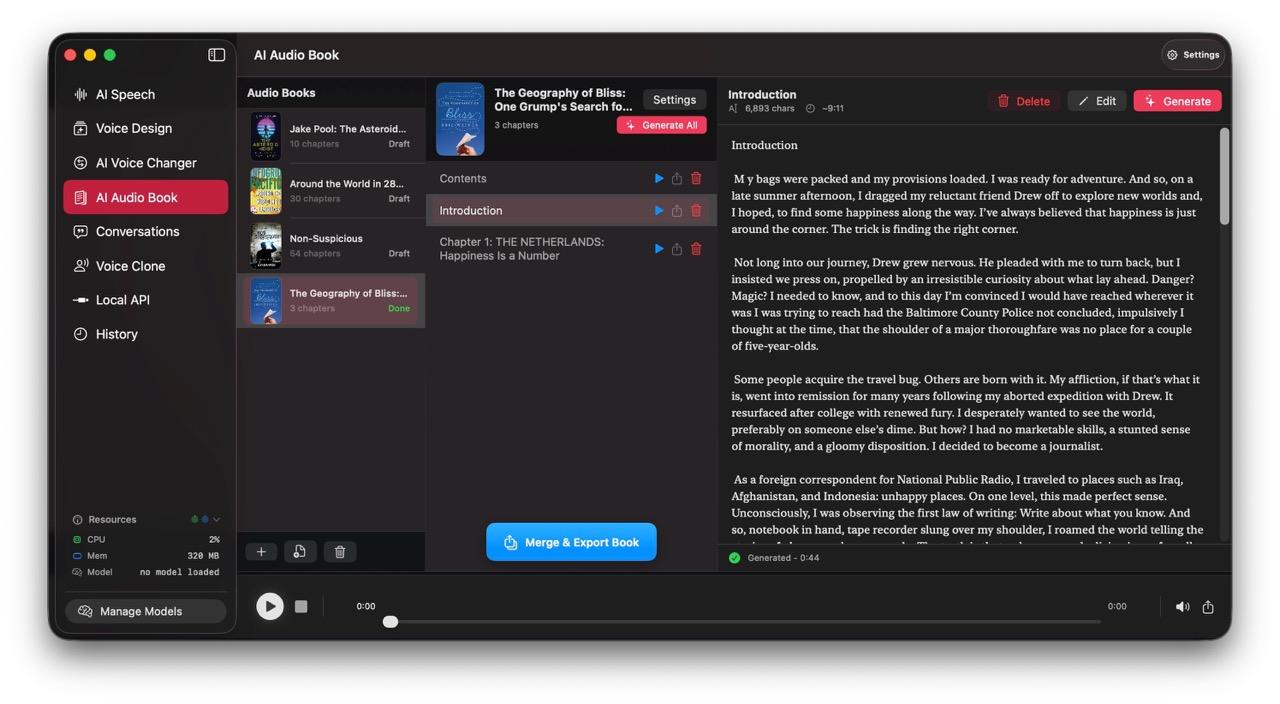
OpenVox also ships recent audiobook export improvements that are especially relevant for long books. Based on the current version history in the site repo as of May 25, 2026, audiobook export now includes M4A as the faster default, M4B support for chapter-aware audiobook compatibility, better export progress, improved cleanup of temporary files, EPUB cover handling, and much faster large-book export behavior.
Best model choices for local audiobook creation
For a quality-first Mac or Windows workflow, MOSS TTS 1.5 supports 31 languages, stable voice cloning, explicit pause control, and native 48 kHz stereo output. For Windows books built around dialogue, VibeVoice TTS is designed for long-form multi-speaker narration with up to four distinct speakers. Both models are available in OpenVox as local model options for their respective platforms. On Windows, also compare FireRedTTS3 for multilingual reference voices, Audio8 TTS for a compact multilingual model, Sopro V2 Turbo for faster short-reference tests, and VoxCPM2 for voice design and 30-language coverage. Preview a chapter before committing to a full audiobook.
Model guide
Which model is best for your audiobook?
Pick based on book length, expression, language coverage, and revision needs.
Kokoro
Best for speed and long-form stability
- Fast on long documents
- Great for manuals and training docs
- Strong default choice for big books
Pick it when
Pick it when you care more about throughput and consistency than maximum drama.
PocketTTS
Best for fast six-language generation and cloning
- CPU-first and lightweight
- Supports six major languages
- Clone a narrator voice with proper permission
Pick it when
Pick it for fast audiobooks in a supported language when you want a consistent custom narrator voice.
Chatterbox
Best for expression and premium narration
- More character and polish
- Great for storytelling and dramatic reads
- Best when voice texture matters
Pick it when
Pick it when you want a more expressive performance.
Qwen3 TTS
Best for realism and refined voice work
- Natural delivery and polish
- Useful when the narrator voice is part of the product
- Works well with Voice Design
Pick it when
Pick it when the audiobook should sound especially refined.
OmniVoice
Best for language reach and broad coverage
- Huge language coverage
- Good for multilingual books
- Useful when coverage matters more than narrow benchmarking
Pick it when
Pick it when your source material spans languages.
The best model depends on what kind of audiobook you are making. There is no single “best” engine for every book, because speed, expressiveness, language coverage, and long-form stability are different priorities.
| Model | Best at | Use it for |
|---|---|---|
| MOSS TTS 1.5 | Studio-grade multilingual narration | Mac and Windows audiobook projects that need 48 kHz stereo output, stable cloning, 31-language coverage, and explicit pause control. |
| FireRedTTS3 | Multilingual cloned narration | Windows projects that need a permitted reference voice across 24 languages or Chinese dialects. |
| Audio8 TTS | Compact multilingual cloned narration | Windows audiobook previews in one of its 11 recommended languages. |
| Sopro V2 Turbo | Fast short-reference voice cloning | Windows narration in English, European Portuguese, French, or German with a clean permitted reference. |
| VoxCPM2 | Multilingual voice design and cloning | Windows narration that benefits from 30-language reach and a larger quality-oriented model. |
| VibeVoice TTS | Long-form multi-speaker narration | Windows dialogue-heavy audiobooks, podcasts, and stories with up to four distinct speakers. |
| Kokoro-82M | Speed and long-form stability | Big books, training material, dense PDFs, and revision-heavy audiobook work. |
| Supertonic 3 | High-speed multilingual generation | Audiobooks, chapter batches, and fast-turnaround narration when you want 31-language support and very fast replies. |
| PocketTTS | Fast six-language generation and voice cloning | Audiobooks in English, Spanish, French, German, Portuguese, or Italian that need efficient CPU generation or a permitted cloned narrator voice. |
| Chatterbox | Expression and richer narration | Storytelling, dramatic reads, and more premium-sounding audiobook delivery. |
| Qwen3 TTS | Realism and refined voice quality | When narrator polish matters and you want a more premium, custom-feeling result. |
| OmniVoice | Language reach and coverage | Multilingual books, regional languages, and documents where language availability is the hard part. |
If you want the simplest default for many long books, Kokoro-82M is usually the strongest place to start because it is fast and practical for long-form generation. Supertonic 3 is especially attractive when speed is the priority across 31 languages, whether you are previewing chapters quickly, batching longer jobs, or moving between audiobook and local API workflows. PocketTTS is another strong option for audiobooks in English, Spanish, French, German, Portuguese, or Italian, especially when you want fast CPU-friendly generation and the ability to use a consistent cloned narrator voice that you own or have explicit permission to use. For books outside those six languages, choose a model with broader coverage. If the listening experience itself is the product, Chatterbox or Qwen3 TTS may be more attractive because the narration can feel richer and more premium. If your book is multilingual or in a less commonly supported language,OmniVoice becomes especially valuable because coverage stops being an afterthought.
Tips for chapter splitting and export
Most audiobook quality issues are not caused by the voice model alone. They come from bad chapter boundaries, overlong sections, or generating too much before checking how the narration actually sounds. A few workflow habits make a big difference.
- Let auto-detection create a first pass, then clean up chapter names before generating anything large.
- Keep chapters reasonably sized so fixes stay local. Small mistakes are much easier to regenerate when one section is not doing too much.
- If a document has headings but weak structure, create manual chapter breaks at natural listening points rather than page boundaries.
- Preview one or two chapters first to confirm pacing, pronunciation, and voice fit before batch-generating the entire book.
- Use one main narrator voice unless the document genuinely benefits from changing tone between chapters or sections.
Export choices matter too. For everyday listening and smaller files, M4A is a practical default. For audiobook players and chapter-aware compatibility, M4B is the more purpose-built format. The recent OpenVox export updates make that distinction more useful because the workflow is now clearly oriented around audiobook-specific output instead of generic audio dumping.
When a local audiobook creator on Mac is the better fit
A local audiobook creator Mac workflow is the better answer when your material is private, your books are large, your revisions are frequent, or your usage is steady enough that subscription pricing starts to feel like rent instead of convenience.
- Private client documents, contracts, internal training, or unpublished manuscripts stay on your machine for core generation.
- Large books are easier to manage when chapter generation and export are built into the desktop workflow.
- You can listen, fix, and regenerate specific sections without treating every pass as another cloud transaction.
- The more often you build audiobooks, the more attractive a local setup becomes operationally.
The practical conclusion
If your goal is to create audiobook from PDF, EPUB to audiobook, or turn plain text into long-form narration, the local workflow is now mature enough to be the smarter default for many people. It is more private, more controllable, and better aligned with real book-length work than a generic cloud text box.
OpenVox is especially compelling here because the app already has the features this use case needs: PDF, EPUB, and text import, chapter handling, per-chapter controls, batch generation, and audiobook-oriented export improvements. If you already have a document and want the fastest path from file to finished audio on your own hardware, this is exactly the kind of workflow local voice software should handle well.