
Decision grid
OpenVox vs Speechify: the real difference
Speechify fits hosted reading convenience. OpenVox fits private local reading, voice creation, and production workflows.
Speechify fit
Best for convenience
- Browser-first reading
- Cross-device access
- Hosted apps and extensions
Tradeoff
Hosted accounts and less privacy by default.
OpenVox fit
Best for ownership
- Select & Read on Mac and Windows
- Local voices, cloning, and audiobooks
- Voice changer, conversations, and local API
Tradeoff
Needs model downloads and device resources, but core generation stays local.
Speechify is good software. Its official product pages position it as a broad reading and productivity platform across web, desktop, mobile, and browser extensions, with support for PDFs, documents, websites, summaries, and cloud-style convenience. That makes it a sensible tool for people who want text read aloud everywhere with as little setup as possible.
But that is also why many users eventually start looking for a Speechify alternative. They are not always asking for the same thing, cheaper. Often they want a different architecture entirely: selected-text reading on their Mac or Windows PC, local text-to-speech, more control over privacy, no recurring dependence on a hosted account, and voice workflows that feel like software they own rather than a service they rent.
Speechify is strongest when hosted convenience across devices matters most. OpenVox is strongest when private local reading, voice generation, and creator workflows matter more than cloud reach.
What Speechify is actually optimized for
Based on Speechify's official site and pricing pages checked on May 25, 2026, the product is centered on cross-device text-to-speech, AI-assisted reading, browser and app access, and a premium subscription model. Its public pricing pages also emphasize a paid reader tier and separate Studio/API products with credits or hosted usage models.
- It is built for reading and listening convenience across multiple devices.
- It supports many input types, including PDFs and web content.
- It uses a hosted product model rather than a local-first Mac runtime.
- Its public pricing emphasizes subscriptions, plans, and credits instead of one local ownership path.
Why OpenVox is a better Speechify alternative for some users
OpenVox is not trying to beat Speechify at being a browser reading platform. It is trying to do something else better: run serious AI voice workflows locally on your own device. That matters if your priority is privacy, offline-friendly operation after setup, fixed-cost generation, or creator-grade voice tools beyond simple reading.
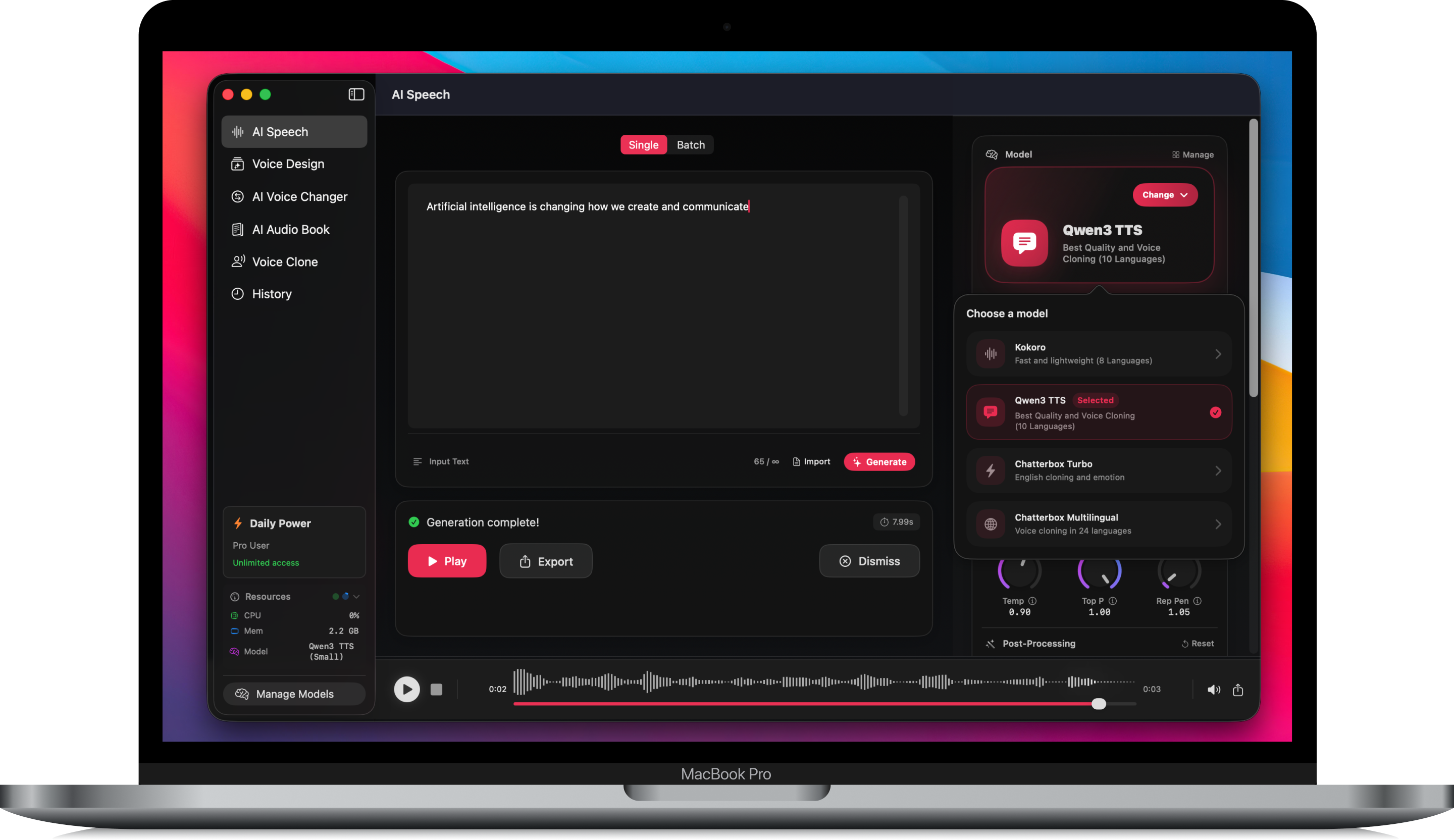
- Select & Read lets Mac and Windows users highlight text in compatible apps and hear it with local voices.
- Core generation runs locally after model download on supported Mac, iPad, and Windows devices.
- OpenVox supports voice cloning, Voice Design, conversations, audiobooks, Voice Changer, and a Local API in one tool.
- The app states that core workflows run locally with no analytics or tracking inside the app.
- The pricing model is much closer to software ownership than to an ongoing subscription relationship.
Select & Read changes the comparison
The biggest update is Select & Read. This is the workflow many Speechify users care about most: highlight text, press a shortcut, and listen. The difference is that OpenVox can make that reading workflow local on Mac and Windows instead of routing your selected text through a hosted reader.
For everyday reading, that means OpenVox is no longer only a production tool for generated narration. It can also behave like a private reading layer for articles, notes, drafts, research, emails, documentation, and scripts. When you want instant reading, use a fast lightweight local model. When you want polished narration, move into the deeper voice-generation tools.
OpenVox now covers more than read-aloud
Speechify is still mostly judged as a reader. OpenVox is better judged as a local voice workspace. That wider surface matters because many people start with read-aloud and then need production features: a reusable narrator, a cloned permitted voice, a podcast-style dialogue, an audiobook chapter, or a local API endpoint for an agent.
- AI Speech: generate natural speech from typed or pasted text with multiple local model options.
- Select & Read: read highlighted text on Mac or Windows with a keyboard-driven workflow.
- Voice cloning: create reusable permitted voices from short samples and keep them local.
- Voice Design: describe a voice style, generate samples, and save the result for later use.
- Conversations: create multi-speaker scripts for interviews, skits, and dialogue scenes.
- AI AudioBook: import long text, PDF, or EPUB-style content and generate longer narration workflows.
- Voice Changer: transform existing audio into another selected voice for permitted use cases.
- Batch and export tools: use longer workflows with MP3/WAV export where supported.
- Local API: expose local voice output for apps, agents, scripts, and automations.
Who should stay with Speechify
Speechify still makes sense if your main need is read-aloud convenience across every device you use, especially if you value web access, mobile continuity, hosted summaries, and a polished cloud reading experience more than local ownership.
Who should switch to OpenVox
OpenVox is the stronger fit if you want private local text-to-speech, Select & Read on Mac or Windows, local voice cloning, audiobook creation, voice conversion, reusable custom voices, or a local API for apps and agents. It is also a better fit if you handle sensitive documents and want the voice layer to behave like part of your own machine rather than a cloud service you keep paying for.
That difference matters more than feature checklists. The real decision is whether you want a reading platform that happens to use AI voices, or a local voice platform that can read selected text and handle serious production workflows on your own hardware.
Source note: the Speechify comparison above references official Speechify site and pricing pages checked on May 25, 2026. OpenVox feature claims reflect current OpenVox site, support, pricing, and privacy copy as of July 2026.