
Decision frame
How YouTube creators should choose voice tools
The real question is not only voice quality. It is how the workflow holds up after repeated uploads and revisions.
Creator input
What you need
- Fast Shorts retakes
- Stable long-form narration
- Multilingual reuse
- Private client drafts
Cloud TTS loop
Fast to start
Pros
Quick setup and browser access.
Tradeoffs
- Monthly cost grows with output.
- Drafts leave your machine.
Best for lighter, browser-first use.
Local TTS loop
Stronger to own
Why creators switch
Better privacy and easier iteration after setup.
Best-fit strengths
- Private script handling.
- Reliable batch generation.
- Fixed software cost.
Best for frequent publishing.
The search for the best AI voice generator for YouTube usually starts with voice quality and ends with workflow pain. The first few tests are easy. You paste a script, pick a voice, export a file, and imagine you are done. Then the real creator process kicks in: alternate hooks, faster intros, sponsor reads, clean retakes, localization, client approvals, and a backlog of videos that all need a voice.
That is where the local vs cloud question stops being theoretical. A cloud tool can be genuinely excellent and still become annoying when your channel grows. A local tool can require more upfront commitment and still become the better system once publishing is routine. If you are evaluating YouTube voiceover AI in 2026, you should be choosing a production model, not only a voice sample.
For frequent creators, the biggest TTS decision is not realism alone. It is whether your voice workflow behaves like software you own or software you rent.
This article is intentionally practical. It compares what creators actually need, where cloud TTS is still useful, where local generation starts winning, and why OpenVox is a strong fit if you want text to speech for YouTube videos without turning every upload into another subscription event.
What creators need from an AI voice generator
Voice quality that survives editing
The voice has to hold up after music, compression, pacing cuts, and transitions. A voice that sounds good in a demo can still fall apart inside a real YouTube timeline.
Fast iteration for hooks and retakes
Creators rarely generate once. They test alternate intros, fix awkward lines, swap emphasis, and tighten pacing. The tool has to make revision cheap.
Language coverage beyond one channel
A serious YouTube voiceover AI setup should support repurposing: secondary languages, regional variants, and voice consistency across multiple formats.
Costs that make sense at upload frequency
An AI voice generator for YouTube is not a novelty purchase. If you publish often, pricing becomes part of your production system and changes your behavior.
Voice quality matters, of course. Emotion matters. Speed matters. Language support matters. But for creators, cost is not a separate category. Cost changes how much you iterate. The wrong pricing model quietly teaches you to stop testing alternate lines, to avoid extra languages, or to keep client revisions to a minimum. That is a bad creative incentive structure.
The best text to speech for YouTube videos is the tool that lets you keep refining the voice until the video is ready, without making you feel like every experiment should be rationed.
Cloud TTS pros and cons
Cloud TTS tools are popular for a reason. They are usually the fastest way to start. You open a browser, sign in, paste a script, and export audio. That convenience is real. It is especially appealing if you are still testing whether AI narration belongs in your workflow at all.
Cloud tools also tend to be strong for cross-device access, quick collaboration, and avoiding any local setup. That can be the right choice for a creator who works across multiple machines, hands scripts to assistants, or wants everything available from a web dashboard.
- Pros: fast onboarding, browser-based access, easy sharing, and no local hardware setup.
- Pros: often strong voices and polished web UX from day one.
- Cons: recurring spend becomes part of production, not a one-time experiment.
- Cons: your scripts, drafts, and client copy are routed through a hosted service.
- Cons: output depends on account access, plan rules, and stable internet.
This is why so many people search for an ElevenLabs alternative for YouTube. It is not because cloud narration is useless. It is because once you upload often, the monthly model starts competing with the rest of your creator budget.
As of May 25, 2026, ElevenLabs' public pricing pages list multiple recurring plans and monthly credit buckets, while its official documentation also frames usage around credits, plan tiers, and model limits rather than a fully local ownership model. That does not make it bad software. It simply means the architecture is optimized for hosted usage, not for creator ownership on local hardware.
Local TTS pros and cons
Local TTS flips the tradeoff. The first day is less magical. You install the app, download models, and learn how the workflow behaves on your own machine. But after that, the relationship changes. The computer you already own becomes the runtime.
- Pros: better privacy for drafts, client videos, unreleased scripts, and internal projects.
- Pros: fixed software cost is easier to reason about than recurring generation bills.
- Pros: local iteration encourages more experimentation because the creative penalty is lower.
- Pros: core generation can continue after model download, even without a cloud dependency.
- Cons: you need supported hardware and a willingness to do initial setup.
- Cons: local tools are less convenient if your workflow is heavily browser-first or mobile-first.
The best local TTS tools are not trying to imitate a browser app exactly. They are trying to give creators a stronger operating model: run the voices on your own machine, iterate aggressively, and stop treating narration like metered cloud inventory.
Why local generation works especially well for frequent YouTube workflows
Cost loop
What happens after month one
Voice AI feels cheap when you test it once. It feels different when narration becomes part of your real publishing system.
Cloud subscription pattern
More uploads, more usage anxiety
- Start with one channel and one voice.
- Add shorts, alternates, revisions, and retakes.
- The TTS bill becomes a recurring operating cost.
- You start rationing experimentation to save credits.
Local creator pattern
More uploads, better system payoff
- Set up the workflow once on your Mac.
- Reuse voices, prompts, and export habits across videos.
- Keep experimenting without per-project billing pressure.
- The workflow gets cheaper per video as volume rises.
The key insight is simple: creator volume changes everything. If you make one video every few months, cloud convenience may be worth the tradeoff. If you publish every week, produce shorts in batches, repurpose content across channels, or sell client voiceover work, your economics and privacy exposure look very different.
Frequent creators benefit from a local setup because the marginal cost of iteration drops. The more videos you make, the more valuable that becomes. You stop thinking in terms of “should I spend more credits on one more variation?” and start thinking in terms of “which take actually makes the video better?”
| Factor | Cloud TTS | Local TTS |
|---|---|---|
| Getting started | Usually faster: sign in, paste text, pick a voice. | Slightly slower: install app, download models, learn the workflow once. |
| Best fit | Occasional narration, remote collaboration, browser-first use. | Frequent publishing, private drafts, fixed-cost production, local ownership. |
| Revision behavior | Easy at first, but repeated takes can increase usage cost. | Once setup is done, heavy iteration is easier to justify operationally. |
| Privacy posture | Your scripts and generations are routed through a hosted platform. | Core generation happens on your own Mac after setup. |
| Offline reliability | Depends on account access and internet connectivity. | Core generation can keep working after models are downloaded. |
| Economics over time | Predictable at low volume, but recurring at any meaningful scale. | Higher setup effort, then better payoff for regular production. |
Example creator workflows where local TTS earns its keep
Creator workflow
Shorts narration
Generate several hooks quickly, swap line reads, and test pacing without worrying that every extra take is another chargeable event.
Creator workflow
Long-form tutorials
Keep one voice consistent across intros, chapter transitions, and dense instructional sections where robotic cadence becomes painfully obvious.
Creator workflow
Multilingual repurposing
Turn one English script into multiple localized versions without rebuilding your whole process around separate cloud quotas or vendor limits.
Creator workflow
Client voiceover work
Handle draft scripts, unreleased product names, and revision-heavy approvals without casually sending that material through a third-party service by default.
Where OpenVox is useful for creators
For Windows creators producing interviews, podcasts, or character-heavy videos, VibeVoice TTS is worth testing because it is built for long-form multi-speaker generation with up to four distinct speakers. Mac and Windows creators who prioritize polished multilingual narration can use MOSS TTS 1.5 for 48 kHz stereo local output.
For a permitted cloned narrator voice on Windows, compare FireRedTTS3for broad language and Chinese dialect coverage, Audio8 TTS for a compact multilingual model, Sopro V2 Turbo for faster short-reference tests, and VoxCPM2 for 30-language voice design and cloning. Generate a short passage with each before producing an entire video.
OpenVox is not just a general TTS app with a YouTube-friendly tagline. It is useful for creators because the feature set matches real production work on Mac and Windows. You can generate local speech, clone voices, design reusable new voices, handle multi-speaker scripts, and work across a very large language set through OmniVoice.
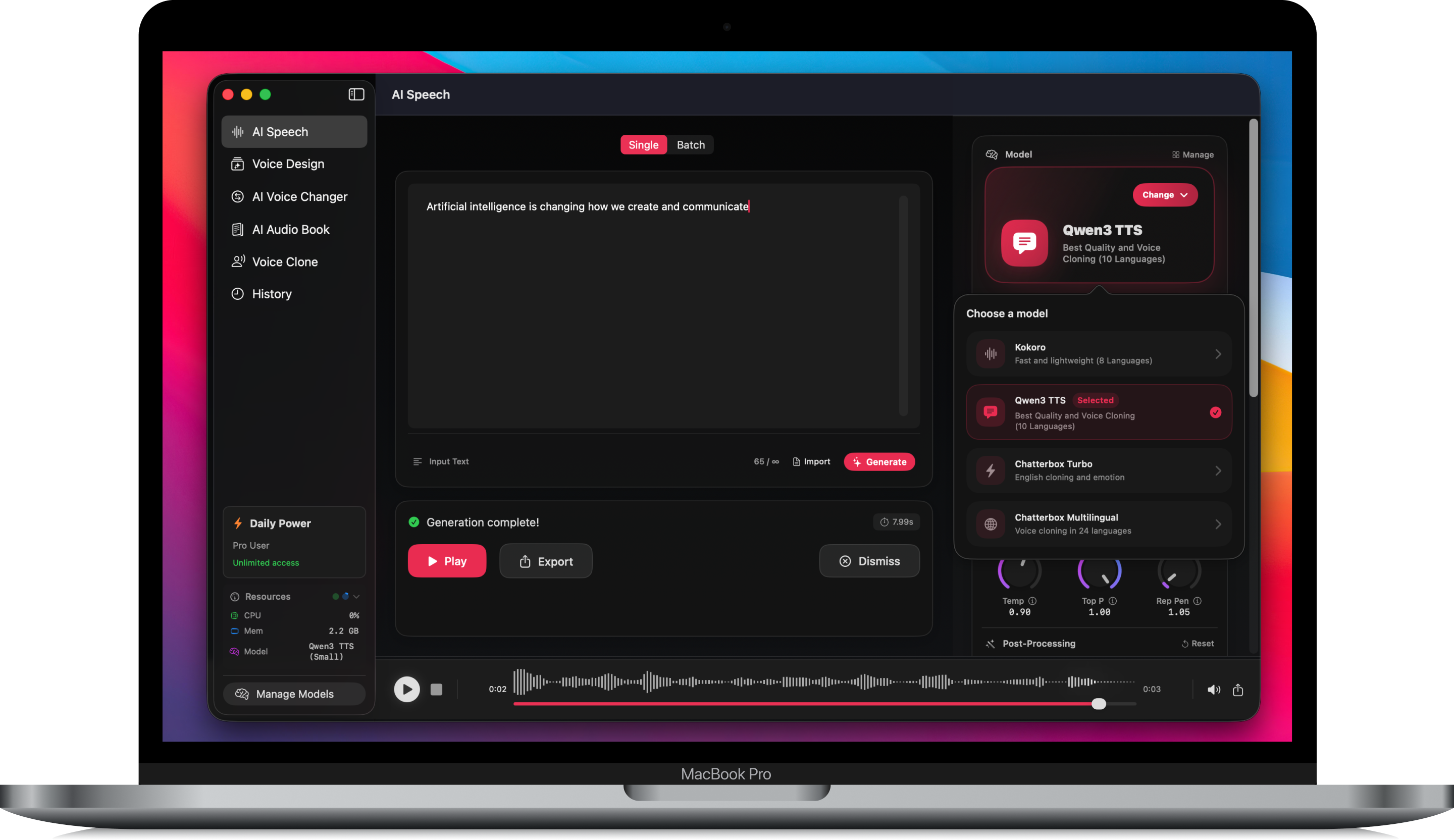
- OpenVox is local-first, so core generation runs on your Mac after setup.
- It supports voice cloning and Voice Design, which is useful for branded channels and repeatable narration styles.
- OmniVoice expands language coverage well beyond the narrow set many creator tools focus on.
- Conversations helps with dialogue, skits, interviews, and multi-speaker scenes without forcing a separate workflow.
- Audiobook-style import and export workflows are useful for longer narration-heavy projects, not only short clips.
- The local API is valuable if your channel eventually automates scripting or rendering steps.
That combination is what makes OpenVox a practical local TTS for creators. It is not only about sounding good. It is about reducing friction in a workflow that repeats every week.
Where cloud still wins
There are still cases where cloud TTS is the better answer. If you need a browser tool accessible from anywhere, if multiple collaborators need the exact same hosted workspace, or if you do not want to rely on a local Mac at all, a cloud platform may fit better. Convenience is a legitimate advantage, not a fake one.
Similarly, if you only make a few narrated videos per year, the setup cost of local software may not matter less than the convenience of a hosted dashboard. The right tool depends on whether voice is an occasional asset or part of your publishing infrastructure.
The practical conclusion
The best AI voice generator for YouTube depends on your volume. For occasional creators, cloud TTS can still be the easier answer. For active channels, faceless content operations, tutorial publishers, multilingual repurposing, and client-heavy workflows, local generation becomes more compelling very quickly.
That is the strongest case for OpenVox. It gives creators a way to treat voice as a durable production capability on their own hardware rather than a metered service they have to keep renting. If you want an ElevenLabs alternative for YouTube that aligns with frequent publishing, privacy, and fixed-cost ownership, the local path is not the compromise anymore. It is often the smarter system.
Comparison note: the cloud pricing and model-positioning references above were checked against public ElevenLabs pricing and documentation pages on May 25, 2026. OpenVox feature references are based on the current OpenVox site and in-repo product pages.