
OpenVox: Local TTS AI
Natural Speech
Completely Private
Generate lifelike voiceovers in seconds using local AI. No cloud, no tracking, complete privacy—powered by Apple Silicon.

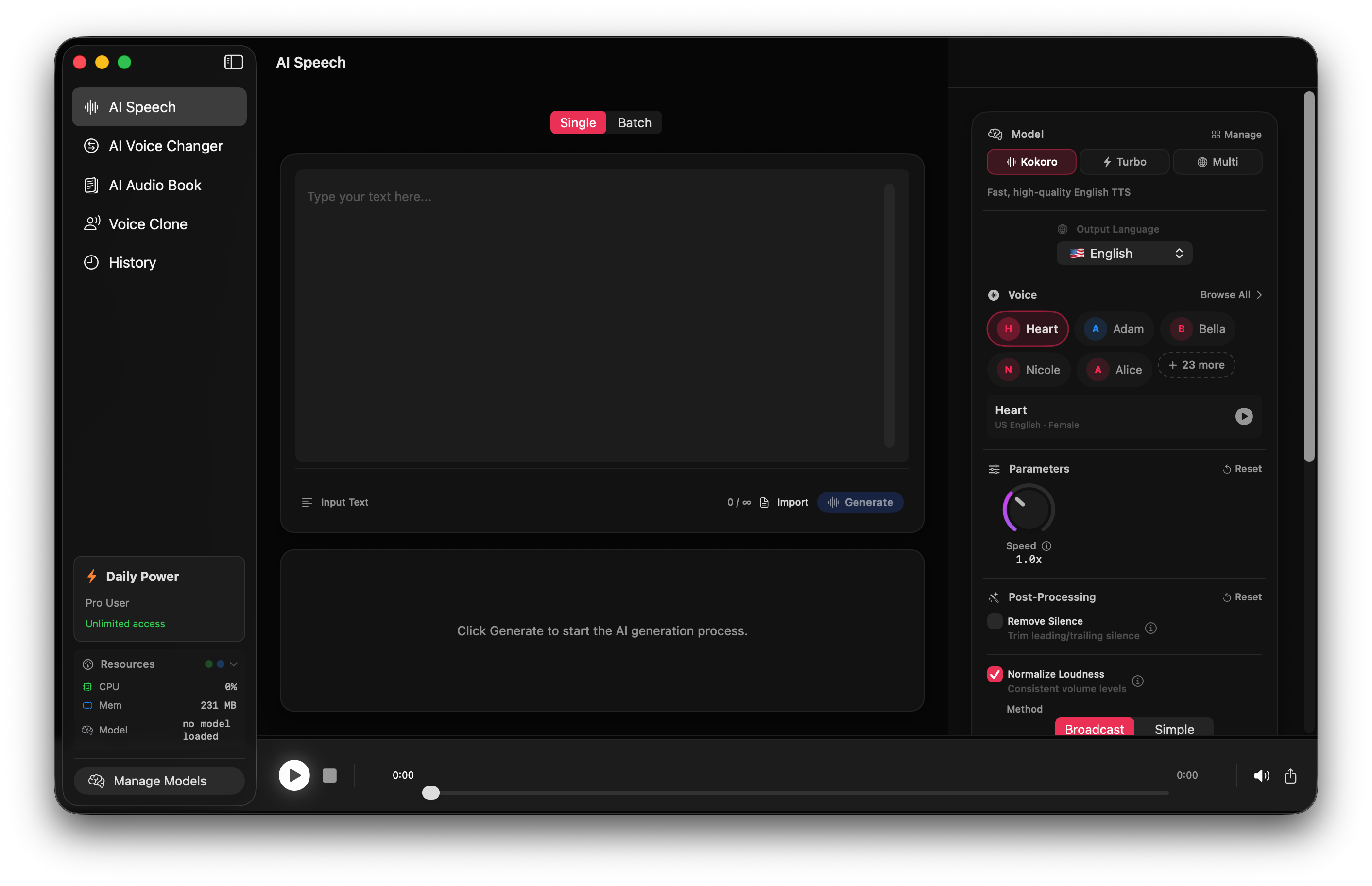
OpenVox - Local AI Text-to-Speech
Beautiful, intuitive interface designed for Mac. Generate natural speech with complete privacy.
100% Private
All processing happens locally on your Mac. No servers, no cloud, no tracking. Your text never leaves your device.
Blazing Fast
Powered by Apple Silicon and MLX. Fast inference optimized for M1, M2, M3, and M4 chips with hardware acceleration.
Offline Ready
After a one-time model download, OpenVox works completely without internet. Perfect for travel or sensitive work.
300+ Voices
Choose from 300+ AI voices across 23 languages. Kokoro-82M for speed, Chatterbox for quality cloning.
How It Works
Type or Import
Enter or paste any text into OpenVox, or use the AudioBook feature to import PDF files for chapter-by-chapter audiobook generation. No length limits.
Choose Voice & Model
Select from 300+ voices across 23 languages. Choose Kokoro-82M for speed or Chatterbox for quality voice cloning. Adjust controls like speed and temperature.
Generate & Export
Click Generate to create speech instantly. Watch real-time progress. Export as WAV, MP3, or M4A for use in your projects.
Perfect For
Content Creators
Generate professional voiceovers for YouTube videos, TikToks, and social media content without hiring expensive voice actors.
Audiobook Publishers
Turn entire books into audio experiences. Import PDFs, organize chapters, and generate hours of content with consistent character voices.
Voice Artists
Clone your own voice to create a digital twin. Scale your production capacity while maintaining your unique brand and sound.
Accessibility
Convert documents, articles, and web pages into high-quality speech for easier consumption by those with visual impairments.
Privacy Advocates
Process sensitive medical, legal, or personal data completely offline. GDPR compliant by design—no data ever leaves your machine.
Writers & Editors
Listen to your drafts read aloud to catch rhythm issues, typos, and awkward phrasing that you might miss when reading silently.
Everything You Need for
Professional Speech
AI Speech Generation
Convert any text into natural, lifelike speech instantly. Choose between Kokoro-82M for blazing speed or Chatterbox for maximum expressiveness and quality.
300+ Voices
Access a massive library of 300+ pre-trained voices across 23 languages. Filter by model, gender, age, or accent to find the perfect match for your project.
AudioBook Creator
Import full PDFs or text files. OpenVox automatically detects chapters and lets you assign different voices to different characters or narrators.
Voice Changer
Transform existing audio files into any target voice. Automatically chunks long files for processing and seamlessly stitches them back together.
Voice Cloning
Clone any voice with just a few seconds of audio. Create custom voice models that run locally on your device using the Chatterbox engine.
Smart History
Never lose a generation. All audio is saved locally with its settings. Search, filter, replay, and export past generations instantly.
🛡️ Privacy First Design
OpenVox was built with a strict "Local-First" philosophy. We believe your voice data and generated content belong to you, not a cloud provider.
Runs Locally
All AI inference happens directly on your Apple Silicon chip.
Zero Telemetry
We don't track what you generate or collect any usage data.
Offline Capable
Once models are downloaded, you can unplug the internet completely.
💻 System Requirements
To ensure the best performance and real-time generation speeds, OpenVox is optimized exclusively for modern Mac hardware.
macOS Sonoma
Version 14.0 or later is required for the latest MLX support.
Apple Silicon
M1, M2, M3, or M4 chips (Pro/Max/Ultra/Base all supported).
Storage & RAM
~2GB free disk space. 8GB Unified Memory minimum (16GB recommended).
What's Included
OpenVox aligns with the tools you need today, with a roadmap for tomorrow.
✅ Full Feature Set (v1.0)
Why Choose OpenVox?
| Feature | OpenVox | ElevenLabs | Murf.ai |
|---|---|---|---|
| Pricing Model | One-Time / Free | Subscription | Subscription |
| Privacy | 100% Local | Cloud Only | Cloud Only |
| Usage Limits | Unlimited (Pro) | Character Credits | Generation Hours |
| Offline Use | ✅ Yes | ❌ No | ❌ No |
| Latency | Zero (Local) | Network Dependent | Network Dependent |
| Commercial Rights | ✅ Included | Higher Tier Only | Higher Tier Only |
Simple Pricing
OpenVox Free
$0
forever- ✓ 5,000 chars/day speech
- ✓ 100 sec/day conversion
- ✓ 3 custom voice clones
- ✓ 300+ Voices & 2 Models
- ✓ 100% Offline & Private
OpenVox Pro
$19.99
one-time- ✨ Unlimited generations
- ✨ Unlimited voice clones
- ✨ Batch Mode & MP3 Export
- ✨ Lifetime Updates included
- ✨ Own it forever (No sub)